
Many new things Happened to Google, Which Seems To Be Innovating Lately much more than a few years ago. A recent “surprises” after Instant Google Has to do with the pre-visualization of the site from the list of results (SERP), Called “Google Instant Preview”.
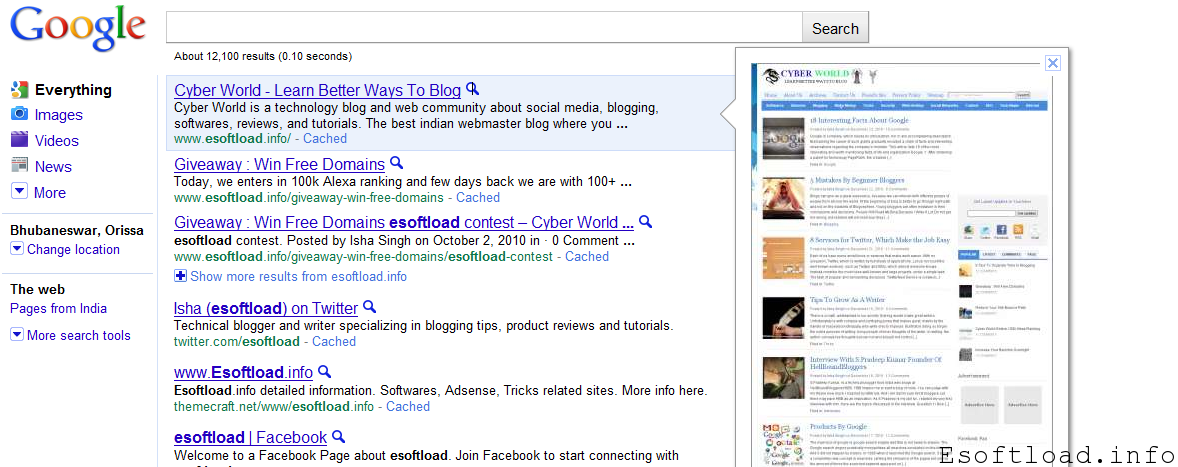
Basically the feature Allows the user to preview the site Before Clicking on the list of results. Just Simply place your mouse over the result or click the magnifying glass icon appears on the right of each, Which will display a screen image capture rate.
For Many, this feature is brand new and have their sites discovered. But for those blogs do not display correctly for details and Perhaps related to design, content, form or structure.
Here are Five Cool Tips Mentioned in this article May Be helpful:
-
Put your logo on the top and Leading
This will do a Better branding of your brand, being to more projecting area of the preview. Do Not Forget to Give a clear background for the purpose of highlighting your logo.
-
Place a text area optimized
For Some screenshots, Google will Consider Paragraphs of text those include keywords where you want to position yourself, and put it as “highlighted” above the preview. That text Use invite people to click.
-
Using colors
If you use a black background as background color, think twice. Dark colors flow to overshadow the preview, Including Not Only But Also the images the content. On the Other Hand, colors like orange, May and May Not Be degraded look attractive.
-
Using Flash
If You Have a header with your logo or promotional banner in Flash, You Better Do Something About It. The Same is Not Displayed at all in the screenshot.
-
Structure
Make sure the site structure as simple as possible. This will make the thumbnail preview show That is easy to navigate and Attract clicks.
You saw your site on Google Instant Preview? If not, you can do better.







thanks, google instant preview is good that helps you out how your site looks when any visitor comes on your site.
thiking of using vector graphics as a background
Hi ,
I think a much needed tip.Thanks for sharing.
Great tips!
Thanks for sharing these.
I still think even with the introduction of google instant. Very few really use it.
What is your take on it?
yes, the service is new.. people will get use of in few days…
Now I need to look my theme design layout! Thanks for tips.
Nice Tips Isha….Google Preview is a good feature it will take some time to get people handy with it…
Hii isha … nice tips its really helpful …thanks for sharing ……
Google instant preview is good feature. User can see website preview by using this very good feature.
now, I’ll have to look into my site’s layout.